
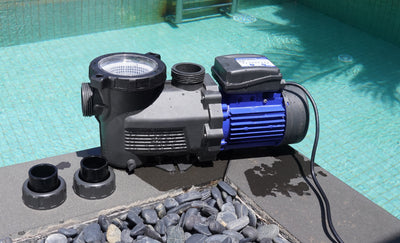


A low sand-filter pressure reading can point to reduced circulation, changed operating settings, or an unreliable gauge. Start by comparing today's reading with your own healthy baseline and looking at the pool returns. Low pressure with weaker return flow calls for circulation checks. An unusual reading with apparently normal flow calls for checking the operating context and the gauge. That is a way to choose the next check, not a diagnosis. A flow problem and a gauge problem can exist together. Before opening anything: switch off and isolate pump power, prevent timers or automation from restarting it, and follow the equipment's pressure-relief procedure. Stand clear. Never loosen a lid, gauge, clamp, or fitting to release pressure. A suspect gauge showing zero does not prove that pressure is gone. If you cannot confirm safe depressurization, stop and call a qualified pool professional. See the manufacturer's pressure-safety guidance.
Compare the same operating conditions first
“Low” is most useful when it means lower than a documented, healthy reading on your own system. Pentair's Sand Dollar/Cristal-Flo II sand-filter manual tells owners to record clean operating pressure while confirming that water returns to the pool. Use your exact model's instructions to establish that reference; its maximum pressure rating is a limit, not a target. Before comparing readings, note:
- Whether the pump is running its usual filtration program.
- The speed or RPM, if the pump has more than one speed.
- The filter's mode and the known normal valve configuration.
- Whether equipment or settings changed since the baseline was recorded.
Lower-speed operation can produce lower pressure and flow, as illustrated in the OptiFlo pump manual. Do not raise speed simply to reach an internet PSI target; connected equipment has its own operating requirements. Also confirm that you are comparing normal FILTER operation. Where the valve manual documents RECIRCULATE, that mode can return water while bypassing the filter media. Normal-looking returns in that mode do not establish normal filtration. Stop the pump before changing a multiport-valve position, and use its exact instructions. Valve functions and safety.
Pair the gauge reading with return flow
Use this table to organize observations before choosing a maintenance step. Visible return flow is a rough clue, not a flow-rate measurement.
| What you observe | What to check next |
|---|---|
| Lower reading after a documented speed or mode change | Compare with the healthy reference for that same setting |
| Lower reading and weaker returns at unchanged settings | Check pool water supply, baskets, and visible air symptoms |
| Zero or an unusual reading with apparently normal returns in FILTER mode | Verify the gauge and operating context; do not assume the gauge is the only issue |
| Little or no return flow, or a pump that is not staying primed | Shut down and follow the exact pump manual; request service if the cause is unclear |
| Higher pressure and weaker returns | Use the separate filter/return-restriction branch and the model's maintenance guidance |
This is an editorial decision framework based on manufacturer troubleshooting guidance, not a test that identifies a failed part.
If returns are weak, start before the filter
Pentair's Triton sand-filter troubleshooting table links diminished return flow plus low filter pressure with obstructions in the pump strainer, pump, or suction line. That supports checking upstream causes before deciding the sand needs attention. Work through the accessible observations:
- Check the pool level. Compare it with the skimmer and pool manufacturer's normal operating level.
- Look for basket debris. Clean only owner-serviceable skimmer or pump baskets using the manual's shutdown, pressure-relief, and restart procedure.
- Record visible air. Note persistent air under a clear pump lid or bubbles at the returns. Pool level, restricted baskets, and suction-side hose, lid, or line problems can accompany these symptoms; bubbles alone do not identify the cause. Circulation-air troubleshooting.
Reassess after each permitted check. If nothing changes, pass the observations to a professional rather than opening the pump or attempting to clear hidden plumbing. The OptiFlo troubleshooting guide lists impeller and suction-line problems among possible causes, but those possibilities do not prove what is wrong with your system. Do not keep running a pump without water. If it has run dry or become hot, leave it shut down and seek guidance before opening it. Pump operation and maintenance.
If returns look normal, verify the instrument
First confirm normal FILTER mode and comparable pump settings. Then consider whether the pressure indication is trustworthy. For its Clean & Clear RP filter, Pentair specifies that the gauge should be readable and undamaged, indicate operating pressure, and return to zero after shutdown and pressure relief. These are useful instrument checks, not sand-filter cleaning instructions or proof that a particular replacement gauge fits. Gauge maintenance. A needle that stays fixed, a damaged dial, or a reading that conflicts with normal operation warrants service. Returning to zero alone does not verify accuracy. Ask a qualified technician or the equipment maker to check the indication and confirm the correct part if replacement is needed. Do not unscrew the gauge while running, pressurized, or uncertain about pressure relief. Do not treat stronger-looking returns as permission to ignore a failed instrument.
Low pressure is not an automatic backwash signal
A loaded sand bed commonly raises pressure while reducing flow; Pentair describes that pattern in its sand-filter manual. Low pressure with weak flow calls for a different investigation. Backwash only when the exact filter's maintenance criteria and procedure support it. Avoid repeating backwashes to chase a low reading. If your symptoms instead involve rising pressure or cloudy water, see our sand-filter pressure and backwash troubleshooting guide. For the equipment's role in circulation, see what a sand filter does.
Keep a short record for the next check
Save a photo of the gauge and a few notes:
- Filter and pump model.
- Current reading and healthy reference, if known.
- Pump program, speed, and valve mode.
- Return-flow change, visible air, and basket condition.
- Recent maintenance and what changed after a permitted check.
This gives support a clearer starting point than “the pressure is low.” Stop homeowner troubleshooting for leaks, cracked equipment, electrical damage, uncertain valve settings, or symptoms that persist after manual-authorized checks. Before adjusting your system, open AQUASTRONG's product manuals and match the instructions to your exact model. If the observations still do not line up, use the model and your notes to request qualified service.

About the author